Most Reorder Points Are Wrong, and It's Not Your Fault
Here's a pattern I see at almost every facility I work with. Someone set the Reorder Points and Maximum Levels during the original Maximo implementation. Maybe it was a consultant. Maybe it was the vendor's recommendation. Maybe it was a materials manager who eyeballed it based on gut feel and whatever the sales rep said the lead time was. That was five, ten, sometimes fifteen years ago.
Since then, consumption patterns changed. Vendors changed. Equipment got decommissioned and replaced. PM programs were added, modified, and eliminated. Lead times got shorter on some items and longer on others. But the stocking levels in Maximo? Those stayed exactly where they were on day one.
The result is predictable. You are overstocked on items nobody uses anymore. You are understocked on items that get consumed faster than the original estimate anticipated. And you are carrying safety stock sized for a vendor that used to take eight weeks to deliver but now ships in three. Every one of those mismatches costs you money: either in capital sitting on shelves doing nothing, or in stockouts and expedited freight when you run out of something you need.
The good news is this is fixable. Not overnight, and not by hiring someone to reset all your min/max levels in a spreadsheet and bulk-upload them back into Maximo. It is fixable with a repeatable process that uses the data Maximo already has.
| How Most Reorder Points Get Set | How Reorder Points Should Be Set |
|---|---|
| Vendor recommendation at commissioning ("the sales rep said keep 25 on the shelf") | Actual 12-month consumption from Maximo issue history |
| Round number guess ("let's just keep 10") | Validated Lead Time (Days) from recent purchase order receipt dates |
| Copied from a similar facility or migrated from a prior system without review | Criticality-adjusted Safety Stock: high buffer for critical single-source items, low or zero for commodity items with fast replenishment |
| One-size-fits-all safety factor (a flat 20% buffer on every item, regardless of criticality or supply risk) | Seasonal adjustment for items with non-uniform demand (turnarounds, PM campaigns, weather-dependent equipment) |
| Never reviewed after initial setup. The number in Maximo today is the number someone typed in 2014. | Reviewed quarterly and updated when consumption, vendor lead times, or equipment changes warrant it |
Compare What You Have Against What You Actually Use
The starting point is simple: pull up the Inventory application in Maximo and compare the Reorder Point and Maximum Level on each item against how much of that item you actually consumed in the last twelve months.
Maximo tracks every material issue in the transaction history. When a tech draws a part against a work order, Maximo records the date, the quantity, the cost, and which work order consumed it. That history is the foundation of every stocking decision you should be making.
Here is the comparison you want to make for each item: take the total quantity issued over the last twelve months and divide by twelve. That gives you average monthly consumption. Now compare that to the Reorder Point on the Inventory record. If the Reorder Point is set at 25 and you are consuming 2 per month, you are holding over a year's supply before reorder even triggers. That is capital sitting on a shelf.
The reverse is also a problem. If your Reorder Point is 3 and you consume 15 per month, you are going to stock out regularly because the reorder trigger fires too late to replenish before you run dry.
You can do this comparison in a few ways. The most accessible is running a report that shows current Reorder Point, Maximum Level, and twelve-month issue quantity side by side. Your Maximo admin can pull this from the transaction history and the Inventory application.
"I need a report showing every active stocked item with its current Reorder Point, Maximum Level, Average Cost, twelve-month total issue quantity, and Last Issue Date. Sort by inventory value descending so I can start with the highest-dollar items." If your admin has Cognos access, this can be built as a reusable dashboard. If not, a spreadsheet export from the Inventory and material transaction data works for the first pass.
Start with the top 50 items by inventory value. Do not try to review all 5,000 items in your first pass. The Pareto principle applies here: your A-class items (the top 20% by value) represent roughly 80% of your inventory investment. Fix those first and the impact is immediate.
For each item, ask three questions. First, does the twelve-month consumption justify the current Reorder Point? Second, does the Maximum Level make sense given the consumption rate and the lead time? Third, when was the last time this item was actually issued? If the Last Issue Date is more than twelve months ago and the item is not an insurance spare, it belongs on the dead stock review list, not in a min/max optimization.
The Lead Time Problem Nobody Talks About
The Lead Time (Days) field on the Inventory record is one of the most neglected fields in Maximo. Somebody typed a number into that field years ago. Maybe it was accurate at the time. Maybe it was a guess. Either way, the vendor's actual delivery performance has almost certainly changed since then.
Here is why this matters for reorder points: your Reorder Point should be at least enough to cover demand during the lead time plus some Safety Stock buffer. If the Lead Time (Days) field says 56 days (eight weeks) but the vendor now delivers in 21 days (three weeks), your Reorder Point is sized for a problem that no longer exists. You are holding five extra weeks of supply on every reorder cycle. Multiply that across hundreds of items and the excess adds up fast.
The reverse is worse. If the field says 14 days but the vendor actually takes 42 days, your Reorder Point triggers too late. By the time the order arrives, you have been out of stock for a month. The result is expedited freight charges, emergency purchases at premium prices, or equipment sitting down waiting for parts.
Validating lead times is straightforward but tedious. Pull the last three to five purchase orders for each item and compare the order date to the receipt date. That gives you actual lead time. If actual lead time is consistently shorter than the stored value, reduce it and recalculate the Reorder Point. If it is consistently longer, increase it.
"I need a report comparing the Lead Time (Days) field on the Inventory record against actual receipt timelines from recent purchase orders for our top 100 items by value. Show me the stored lead time, the average actual lead time from the last three POs, and the difference." This report is the basis for a lead time correction campaign.
I recommend validating lead times at least annually, and more frequently for A-class items or items sourced from vendors with known reliability issues. If a vendor has been acquired, changed distribution centers, or shifted manufacturing overseas since you last updated the Lead Time (Days) field, the stored value is almost certainly wrong.
Safety Stock Is Not One Number for Every Item
I see this constantly: an organization sets Safety Stock at a flat percentage across the board. Ten percent buffer on everything. Or twenty units, regardless of what the item is. That approach guarantees you are simultaneously overstocked on items that do not need a buffer and understocked on items that do.
Safety Stock exists to protect you against two sources of uncertainty: demand variability (consumption is not perfectly predictable) and supply variability (the vendor does not always deliver on time). The right Safety Stock level depends on how much of each type of uncertainty applies to each item.
A bearing for a critical pump that runs 24/7 with a history of unpredictable failures and a single-source vendor with spotty delivery? That item needs a meaningful Safety Stock buffer. A box of standard nitrile gloves available from five distributors with next-day shipping? That item needs almost no safety stock because the supply risk is near zero and replenishment is essentially instant.
Here is a practical framework for right-sizing Safety Stock without a statistics degree:
High Safety Stock (size for 4 to 6 weeks of additional consumption): items tied to critical assets (Criticality A or B), items with a single source vendor, items with lead times over 30 days, items with volatile consumption patterns (large spikes from unplanned failures).
Moderate Safety Stock (size for 2 to 3 weeks of additional consumption): items tied to non-critical assets with moderate lead times, items with multiple vendors but lead times over 14 days, items with steady consumption but no alternative if a stockout occurs.
Low or Zero Safety Stock (standard lead time coverage is sufficient): commodity items available from multiple vendors with short lead times, items with low unit cost where expedited shipping is cheaper than carrying stock, items consumed only by scheduled PMs with predictable demand.
The Safety Stock field in the Inventory application lets you set this value per item. Use it. Combined with the Reorder Point and Maximum Level, it gives you a complete stocking profile for each item. The Reorder Point triggers the reorder. The Safety Stock defines how much buffer you are carrying inside that reorder point. The Maximum Level caps the order quantity so you do not over-buy.
If you want to put concrete numbers behind this instead of guessing, I built a free Reorder Point Calculator that computes Reorder Point, Safety Stock, Maximum Level, and economic order quantity from your consumption rate, lead time, and target service level. It replaces the spreadsheet most people use for this.
Seasonal Demand Breaks the "Average Monthly Consumption" Assumption
Average monthly consumption is a useful starting point, but it lies to you for items with seasonal demand patterns.
Consider a facility that does a major annual turnaround every September. During that month, consumption of gaskets, seals, filters, and fasteners spikes to three or four times the normal monthly rate. For the other eleven months, consumption is steady. The twelve-month average looks reasonable, but if your Reorder Point is set to the average, you will stock out every September and over-order for the rest of the year.
The same problem shows up in any facility with seasonal PM campaigns, weather-dependent equipment (HVAC, cooling towers, heating systems), or production schedules that ramp up and down through the year.
The fix is to identify items with seasonal demand patterns and handle them separately from your standard min/max process. For these items, you have two options. First, you can set the Reorder Point and Maximum Level to cover the peak demand period, accepting that you will carry excess stock during the off-peak months. This is the simple approach and it works if the carrying cost of the seasonal overstock is less than the cost of a stockout during peak season. Second, you can adjust the Reorder Point and Maximum Level before the peak season (increase in August, revert in October) as part of a planned stocking review. This is more work but avoids the off-season overstock.
Either way, the items need to be identified and flagged. During your quarterly review, separate seasonal items from steady-consumption items and manage them with different logic. Do not let a September turnaround distort your assessment of items that consume evenly throughout the year.
The Quarterly Review: Who, What, and When
Right-sizing reorder points is not a one-time project. Consumption patterns shift. Vendors change. Equipment gets replaced. A number that was right in January may be wrong by July. The quarterly min/max review is the process that keeps your stocking levels aligned with reality.
Here is what the meeting looks like.
Who is in the room: The Materials Manager (owns the agenda and the stocking decisions), the Storeroom Supervisor (brings the physical reality: what is actually on the shelves, what has been sitting untouched, what keeps running out), and the Maintenance Manager (brings the demand side: upcoming PM campaigns, planned outages, new equipment, decommissioned assets). If you have a Purchasing lead, include them for vendor performance and lead time input.
What they bring: The Materials Manager brings the consumption-to-stocking comparison report for the top items by value. The Storeroom Supervisor brings the dead stock watchlist (items with no issues in 12+ months). The Maintenance Manager brings upcoming work that will drive demand changes: new PM schedules, planned asset retirements, turnaround plans.
What triggers a change: An item where the twelve-month consumption is more than 50% above or below what the current Reorder Point supports. An item where the Lead Time (Days) field differs from actual vendor performance by more than two weeks. An item flagged as dead stock that the Maintenance Manager confirms has no future demand. An item tied to a new PM schedule that does not yet have stocking levels established.
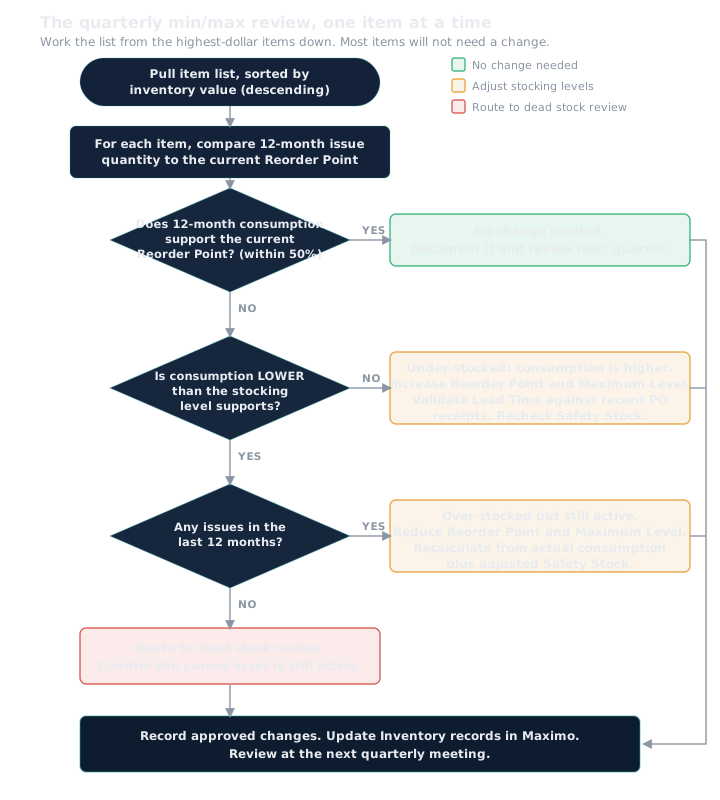
The meeting should take 60 to 90 minutes. If it takes longer, you are trying to solve problems in the room instead of identifying them for action between meetings. The output is a list of items with approved changes: updated Reorder Points, updated Maximum Levels, updated Lead Time (Days) values, and items routed to the dead stock review.
"After each quarterly review, I'll have a list of items with updated Reorder Points, Maximum Levels, and Lead Time values. I need a process to update those fields in the Inventory application efficiently. If we have more than 50 changes, a bulk update through an import process is faster than editing each record individually." Your admin can set this up as a standard post-review workflow.
The Connection to Inventory Turns and Dead Stock
Here is why this matters beyond just getting the right number of parts on the shelf.
Inventory Turns measures how fast your inventory investment is cycling: total value consumed divided by average value on hand. When your Reorder Points and Maximum Levels are set too high, your denominator (average inventory value) is inflated. Your capital is trapped on shelves instead of being deployed elsewhere. Right-sizing min/max levels is the primary lever for improving Inventory Turns on active stock.
The math is direct. If you reduce average on-hand inventory by 20% through proper min/max optimization while maintaining the same consumption rate, your Inventory Turns ratio improves by 25%. At a facility carrying $3 million in inventory, that 20% reduction frees $600,000 in capital and saves $120,000 per year in carrying costs (at a conservative 20% carrying cost rate).
| Facility Size | Total Inventory Value | Estimated Overstock % | Overstock Dollar Value | Annual Carrying Cost Savings (at 20%) |
|---|---|---|---|---|
| Small facility (single storeroom) | $500,000 | 25% | $125,000 | $25,000/year |
| Mid-size facility (2-3 storerooms) | $3,000,000 | 20% | $600,000 | $120,000/year |
| Large multi-site (6+ storerooms) | $15,000,000 | 20% | $3,000,000 | $600,000/year |
Overstock percentages are typical for organizations that have never conducted a formal min/max review. Your actual overstock may be higher or lower depending on how recently stocking levels were validated. Carrying cost includes warehousing, insurance, depreciation, and the opportunity cost of capital. Use the free Inventory ROI Calculator to run the numbers for your facility.
But here is the critical guardrail: you cannot just cut stocking levels to improve Turns and call it a win. If you reduce Reorder Points across the board without considering criticality and demand patterns, you will improve Inventory Turns for exactly two months before the stockouts start. Then you spend every dollar you saved (and more) on expedited freight and overtime labor for emergency repairs.
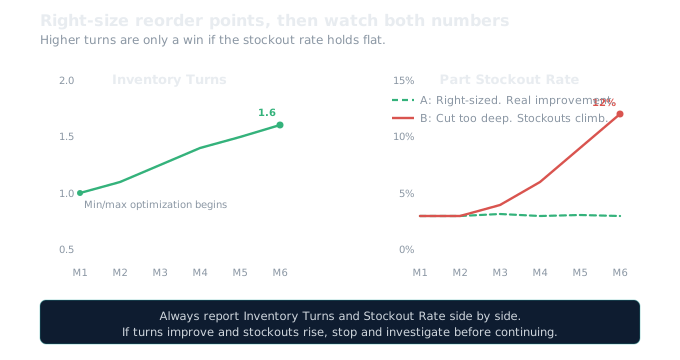
The quarterly review is also where you catch dead stock before it accumulates. Every item that shows up with zero consumption in twelve months and no tie to an active asset is a dead stock candidate. Catching it during the min/max review means it gets routed to disposition instead of sitting on the shelf for another year. Dead stock is the single largest reason Inventory Turns look bad at most facilities. A formal dead stock process, integrated into the quarterly review, prevents the problem from rebuilding after you clean it up.
Where to Start
If you have never done a formal min/max review, here is the sequence.
First, get the consumption-to-stocking comparison report from your admin. Start with the top 50 items by inventory value. Do not try to boil the ocean.
Second, for each of those 50 items, compare twelve-month consumption to the current Reorder Point and Maximum Level. Flag anything where the stocking level is more than 50% above or below what consumption supports.
Third, validate the Lead Time (Days) field on those same 50 items against recent purchase order receipt dates. Update any that are off by more than two weeks.
Fourth, review the Safety Stock value. Is it a flat number applied blindly, or does it reflect the item's criticality and supply risk? Adjust where needed.
Fifth, schedule the first quarterly review meeting with your Storeroom Supervisor and Maintenance Manager. Bring the findings from steps two through four as the agenda.
Sixth, after the first review, set up the recurring quarterly cadence. The first one takes the longest. Once the process is established, each subsequent review builds on the last.
Use the free Reorder Point Calculator to set the new values item by item, the Inventory Turns Calculator to see where your turns stand before you start, and the Dead Stock Cost Calculator to quantify how much dead stock is costing you. Those numbers make the business case for the review process if you need leadership buy-in.
This article covers the conceptual framework for setting and validating reorder points. The Maximo KPI Guide to Inventory Turns walks through the full implementation from consumption analysis through systematic min/max optimization, including the queries that identify items where stocking levels don't match consumption, the automation for ABC reclassification, the Cognos dashboard that surfaces your worst-performing items by value, and the trigger-action matrix for maintaining the right stocking levels over time.
Frequently Asked Questions
How do I set Reorder Points in Maximo?
Start by pulling twelve-month issue history from Maximo transaction data for each item. Divide total quantity issued by twelve to get average monthly consumption. Your Reorder Point should cover demand during the lead time plus a safety stock buffer sized to the item's criticality. Compare this calculated value against the current Reorder Point field on the Inventory record.
How often should I review Reorder Points?
Quarterly, starting with your A-class items (the top 20 percent by inventory value). Consumption patterns, vendors, equipment, and PM programs all change over time. A Reorder Point set five or ten years ago is almost certainly wrong. The quarterly review compares current stocking levels against actual consumption and flags mismatches for adjustment.
How does lead time affect Reorder Points in Maximo?
Your Reorder Point must cover demand during the lead time. If the Lead Time Days field says 56 days but the vendor now delivers in 21, your Reorder Point is sized for a problem that no longer exists and you are holding excess stock. If the field says 14 days but delivery actually takes 42, you will stock out regularly. Validate lead times by comparing the last three to five purchase order dates against receipt dates.
What is the connection between Reorder Points and dead stock?
Reorder Points that are set higher than annual consumption cause a slow, invisible accumulation of excess. The system reorders every time the balance drops below the minimum, even if consumption has fallen. Over time you end up with 25 units on the shelf for an item you use 3 per year. That excess becomes dead stock that drags your Inventory Turns down and ties up capital.
Quick Maximo questions are always free. Reach out on LinkedIn. I never charge for chatting.