Your Storeroom Is a Bank Account Nobody Audits
Every part sitting on a shelf is cash that is not doing anything else. It is not earning interest. It is not funding a reliability improvement. It is not paying for the contractor to clear your backlog. It is sitting in a bin, depreciating, and costing you 15 to 25 cents on the dollar every year just to keep it there. That is warehouse space, insurance, taxes, depreciation, obsolescence risk, and the opportunity cost of that capital doing literally anything else.
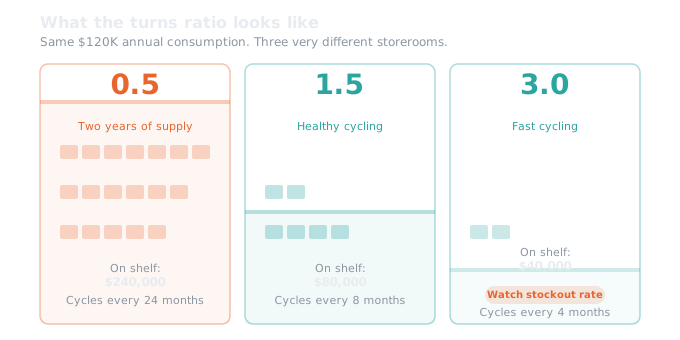
Inventory Turns tells you how fast that money is cycling. A turns ratio of 1.0 means your entire average inventory value was consumed and replaced once during the year. A ratio of 2.0 means twice. A ratio of 0.5 means you are holding two years of supply on your shelves at current consumption rates.
Here's the thing: in MRO, you cannot chase turns the way a retailer does. A retailer wants 10 or 15 or 20 turns per year because every turn represents revenue. Your storeroom does not generate revenue. It exists to prevent downtime. The parts on those shelves are insurance against equipment failure. So the question is not "how do I maximize turns" but "how do I make sure every dollar sitting on a shelf is actually needed and appropriately sized."
That reframing matters because it changes the conversation with finance. Finance sees $3 million in inventory and asks "why do we have so much?" The answer is not "because maintenance needs it." The answer is "here is how fast it is moving, here is the carrying cost, here is what is sitting unused, and here is the plan to right-size it without creating stockout risk."
Without Inventory Turns, you are defending inventory levels with anecdotes. With it, you are defending them with data.
The Formula (and the Mistake Almost Everyone Makes)
The calculation is straightforward:
Inventory Turns = Total Value of Materials Issued (Rolling 12 Months) ÷ Average On-Hand Inventory Value
Your numerator is how much you consumed from the storeroom over the last twelve months. Your denominator is how much was sitting on the shelves, on average, during that same period.
Here is where most organizations get the calculation wrong, and I mean fundamentally wrong, not just a rounding difference.
Rotating assets are invisible if you only count issues. In Maximo, you cannot "issue" a rotating asset the way you issue a box of filters. A rotating asset is an asset record. It has a serial number, a maintenance history, and a location. When a tech needs a replacement motor from the storeroom, Maximo transfers the asset from the storeroom location to the operating location. The transaction type is TRANSFER, not ISSUE. If your Inventory Turns query only counts issues, you are blind to every pump, motor, gearbox, and valve actuator that moved through your storeroom. For a facility with a significant rotating spares program, that can undercount the numerator by 20 to 40 percent. Your turns look terrible, but only because you are not counting a quarter of your actual consumption.
Returns need to be netted out. When a tech returns unused parts from a work order, Maximo records a RETURN transaction. If you only sum issues without subtracting returns, you are overstating consumption. The difference might be small, but on high-volume items it adds up.
Inter-storeroom transfers are not consumption. Parts moving between your central warehouse and a satellite storeroom are inventory repositioning, not consumption. If your query counts all transfers, you are inflating the numerator every time someone moves stock between locations.
Non-stocked direct purchases do not belong in the denominator. Some items are purchased directly to a work order without ever sitting on a shelf. They create transaction records, but they never hold a balance in your storeroom. If you include their cost in the numerator without a corresponding entry in the denominator, your turns ratio is artificially inflated. Either exclude them from the numerator entirely or report direct purchase spend as a separate line.
The most common mistake I see: organizations run a "simple" query that sums all material transaction costs regardless of type, divide by the current inventory value, and call it done. That query double-counts returns, includes inter-storeroom transfers as consumption, misses the rotating asset distinction, and may include non-stocked direct purchases. The number looks reasonable, so nobody questions it. But it is not measuring what you think it is measuring.
| Transaction Type | What Your Query Probably Counts | What It Should Count |
|---|---|---|
| Consumable issues | Yes | Yes |
| Rotating asset transfers | Missed entirely | Yes |
| Returns | Not subtracted | Subtracted from numerator |
| Inter-storeroom transfers | Counted as consumption | Excluded |
| Non-stocked direct purchases | Included in numerator | Excluded or reported separately |
The Average Inventory Problem
The denominator deserves its own section because this is where the second major error happens.
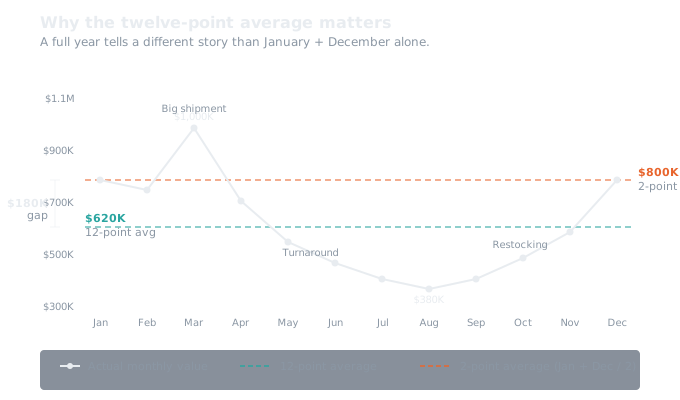
You need the average on-hand inventory value over the measurement period, not just a snapshot. If you take today's inventory value and divide your twelve months of consumption by it, you get a number. But that number is misleading if you received a $200,000 shipment last week, or if you just finished a turnaround that consumed half your consumable stock.
The right approach is twelve monthly snapshots: capture the total stocked inventory value at the end of each month for twelve months, then average them. This catches mid-year fluctuations from large receipts, seasonal PM campaigns, and turnaround events.
The shortcut of (beginning value + ending value) / 2 is common but misses everything that happened in between. If you received a large shipment in March and ran it down through September, the simple average of January and December misses that mid-year bulge entirely. For most organizations, the difference between the shortcut and the twelve-point average is 10 to 20 percent. That is enough to change your threshold band from Yellow to Green or from Green to Yellow, which means it is enough to change whether you take action.
What Good Looks Like (and Why Your Number Depends on Your Industry)
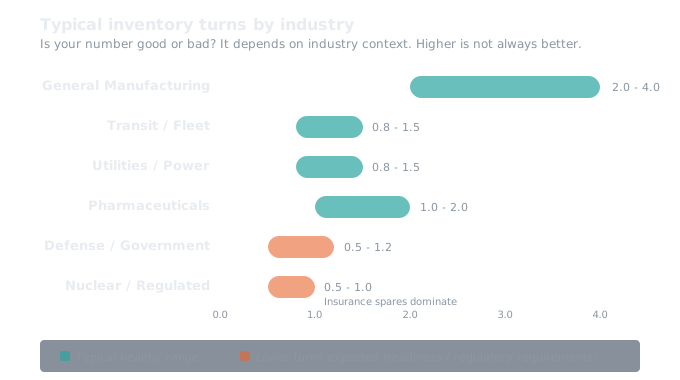
Most MRO organizations I work with baseline between 0.8 and 1.5 aggregate turns. Below 0.8 usually indicates significant dead stock, over-stocking, or poor procurement patterns. Above 1.5 aggregate (including insurance spares) typically indicates either a lean operation or under-stocking that is creating stockout risk.
But the "right" number depends entirely on what you maintain.
Utilities and power generation can run lower turns and be perfectly healthy. Critical infrastructure requires high availability, and many specialized parts have lead times measured in months. A utility at 1.0 aggregate turns with a well-justified insurance spare program might be in exactly the right position.
Transit and fleet operations see moderate turns with seasonal variation. Older fleets need more safety stock and produce lower turns. I have worked with transit agencies where the bus fleet was 15 years old and turns were 0.7, and that was appropriate given the unpredictability of failure patterns on aging equipment.
General manufacturing is where turns expectations are highest because the supply chain is more flexible and lead times are shorter. Manufacturing facilities should target 2.0 to 3.0 for active stock, with consumables pushing toward 4.0 to 6.0.
Defense and government have readiness requirements that override capital efficiency. Holding 180 days of supply for a deployable system is not overstocking. It is the mission requirement. I built my first Maximo implementations in this space, and I can tell you that finance and readiness are often in direct tension.
Here is my recommendation: do not set a target until you have a baseline. Run the calculation for at least three months before you decide what "good" looks like for your organization. Six months is better. Twelve months gives you a full seasonal cycle. During that period, do not adjust stocking levels. Just measure. Then set your first-year target at a 20 to 30 percent improvement for active stock. That is aggressive enough to drive action but achievable enough to not demoralize the team.
The Two Numbers You Must Report Together
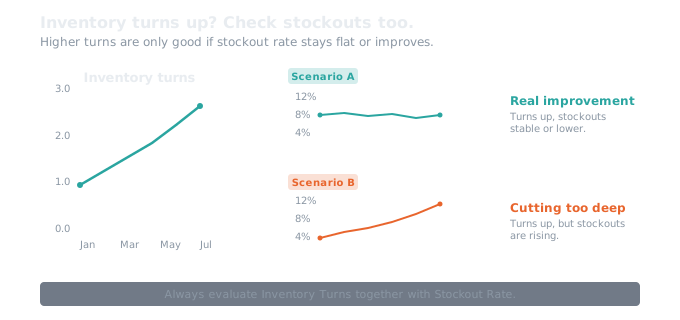
Inventory Turns is one of the easiest KPIs to game. Cut min/max levels across the board and your turns ratio improves immediately. The problem shows up two months later when techs cannot find the parts they need and equipment sits down waiting for expedited shipments.
This is why you never report Inventory Turns without also reporting Part Stockout Rate. These two numbers are a bookend pair. They must be read together because improving one without watching the other creates a different problem.
If turns are improving and stockouts are stable or declining, you are doing real improvement work. If turns are improving and stockouts are rising, stop everything and investigate. You are cutting too deep on safety stock, and the capital you "saved" is about to come back as expedited freight charges, overtime labor, and production downtime.
Every Inventory Turns review meeting should open with two numbers on the screen: current turns and current stockout rate. If you are only looking at turns, you have half the picture.
Insurance Spares: The Exception That Changes Everything
A $200,000 turbine rotor spare that sits for five years is not waste. It is a bet against a $2,000,000 extended outage. Those parts exist outside the turns improvement conversation, and including them in your denominator drags down the aggregate number and makes it look like your storeroom is underperforming when it is actually working as designed.
My recommendation is to calculate two versions.
Version A is the aggregate number: everything in the storeroom, including insurance spares. This is what you report to finance and leadership because it shows the total capital picture.
Version B excludes insurance spares and dead stock from the denominator. This is what you report to the materials team because it shows the operational velocity of your working storeroom.
Many organizations find that their aggregate turns look terrible (0.6 to 0.8) until they segment out the insurance spares, at which point active stock turns are actually reasonable (1.5 to 2.5). That distinction matters when you present to leadership, because the conversation shifts from "we have too much inventory" to "we have appropriate insurance coverage and here is how our active stock is performing."
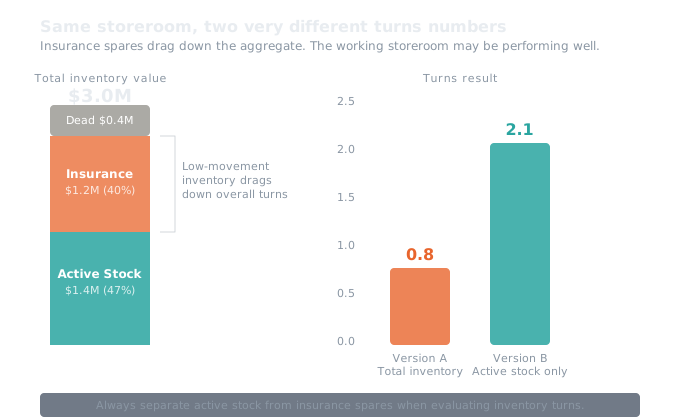
The migration path: start with Version A. Once your ABC classification is mature and your insurance spare tagging is reliable, add Version B as a companion. Report both. Never drop Version A.
Dead Stock: Where the Real Money Is
In my experience, first-time dead stock analyses find 10 to 25 percent of total inventory value sitting unused. At a facility with $3 million in inventory, that is $300,000 to $750,000 of capital doing nothing.
Dead stock is any item with a current balance on hand and no issue transactions in 24 or more months that is not an insurance spare. The parts are on the shelves. They have been there for two years or more. Nobody has needed them.
Common causes: the parent asset was decommissioned but nobody told the storeroom. A design change replaced a component but the old parts were never removed. A procurement mistake during commissioning loaded the shelves with parts that were never needed in the quantities ordered. A merger brought in duplicate SKUs that split demand and made each individual item look like a slow mover, when the combined demand was actually healthy.
The action categories are straightforward.
| Category | Example | Action |
|---|---|---|
| Asset decommissioned | Spare bearings for a pump line removed in 2022 | Sell to surplus, transfer to sister facility, or write off |
| Valid but over-stocked | 48 units on hand, 3 consumed per year, min/max set during commissioning | Reduce to 12 units, adjust reorder point |
| Possibly miscounted or mislabeled | System says 20, description doesn't match bin label | Physically verify before any action |
Dead stock does not disappear on its own. Without a formal quarterly review, it accumulates until someone runs a report three years later and finds half a million dollars in parts for equipment that was removed in 2019.
Where to Start
If you have never measured Inventory Turns before, here is the sequence I recommend.
Start by confirming your data. Before you calculate anything, you need to know whether your system balances match your shelves. If your cycle count accuracy is below 90 percent, fix that first. The turns number you get from bad balance data will be misleading, and any decisions you make based on it will be wrong.
Next, classify your inventory. Populate the ABC classification on every stocked item based on annual consumption value. Tag your insurance spares. This segmentation is what lets you calculate Version B and set meaningful targets by inventory class instead of just one aggregate number.
Then calculate your baseline. Run the turns formula monthly for at least three months, preferably six. Do not adjust stocking levels during the baseline period. You need to see where you actually are before you decide where to go.
Then set your targets. Use your baseline, not someone else's benchmark. A 20 to 30 percent improvement on active stock in the first year is a reasonable starting point.
Then build the review rhythm. Monthly turns review with the Materials Manager and Maintenance Manager. Quarterly dead stock review. Weekly cycle counts on your A-class items. This is the process that sustains the improvement. Without it, the number might improve for a quarter and then drift back.
And from day one, track the stockout bookend. Every time you look at turns, look at stockouts. Every time.
Putting Real Numbers On It
To make this concrete, here is what turns improvement actually translates to in dollars.
If you have $500,000 in total inventory and you improve turns from 0.8 to 1.2, you free up roughly $167,000 in capital. At a 20 percent carrying cost rate, that is $33,400 per year in savings. Plus whatever you recover from the dead stock liquidation. If 15 percent of your inventory is dead stock (typical for facilities that have never done a formal review), that is $75,000 in one-time capital recovery.
At $3 million in inventory, the same improvement frees up roughly $1,000,000 in capital and saves $200,000 per year in carrying costs.
At $15 million across six storerooms? The numbers get very large very fast.
| Facility Size | Inventory Value | Turns Improvement | Capital Freed | Annual Carrying Cost Savings |
|---|---|---|---|---|
| Small | $500,000 | 0.8 → 1.2 | ~$167,000 | ~$33,400/yr |
| Mid-size | $3,000,000 | 1.0 → 1.5 | ~$1,000,000 | ~$200,000/yr |
| Large (multi-site) | $15,000,000 | 0.7 → 1.2 | ~$5,000,000+ | ~$1,000,000+/yr |
I built a free calculator that does this math for your specific numbers: Inventory Turns Calculator. Plug in your total inventory value, your current turns, your target turns, and your carrying cost percentage. It shows you the capital freed, the annual carrying cost savings, and the dead stock recovery potential. Use it to build the business case before you walk into the meeting.
Now the honest part. "Freed capital" is not the same as "cash in the bank." Reducing inventory by $1,000,000 means you stop buying $1,000,000 worth of parts you do not need over the course of the improvement period. It does not mean someone writes you a check. The savings show up as reduced procurement spend, lower carrying costs, and freed warehouse capacity. They are real, but they are realized over time, not overnight. Be transparent about that when you present the numbers. Nothing kills credibility faster than overpromising the payback timeline.
What This Article Covers and What It Does Not
This article gives you the concept, the formula, the common mistakes, the targets, and the process to start measuring. That is enough to calculate your baseline, identify your dead stock, and build the business case for improvement.
What it does not cover is the full Maximo implementation: the specific database objects and fields you need for the queries, the KPI Manager configuration, the Cognos dashboard design, the Start Center portlets, the data integrity rules, the detailed root cause playbooks for every scenario, and the SQL queries that handle rotating assets, returns, inter-storeroom transfers, and all the edge cases I described above.
That is what the Maximo KPI Guide to Inventory Turns covers. It walks through the entire implementation from field mappings through reporting, with every query, every configuration step, and every drilldown documented. If you are at the point where you understand the concept and you need to build it in your Maximo environment, that guide is the next step.
Frequently Asked Questions
What is Inventory Turns in Maximo?
Inventory Turns measures how many times your MRO storeroom cycles through its stock in a given period. The formula is Total Value of Materials Issued over a rolling 12 months divided by Average On-Hand Inventory Value. A turns ratio of 1.0 means your entire average inventory value was consumed and replaced once during the year.
What is a good Inventory Turns ratio for MRO?
Most MRO organizations baseline between 0.8 and 1.5 aggregate turns. Below 0.8 usually indicates significant dead stock or over-stocking. Above 1.5 aggregate typically indicates either a lean operation or under-stocking that may be creating stockout risk. The right number depends on your industry, your equipment mix, and how much insurance spare inventory you carry.
Why is my Inventory Turns calculation wrong in Maximo?
The most common errors are missing rotating asset transfers (which use TRANSFER transactions, not ISSUE), failing to net out returns, counting inter-storeroom transfers as consumption, and using a single point-in-time snapshot for average inventory instead of a twelve-point monthly average. Any of these can move the result by 10 to 40 percent.
Should I report Inventory Turns and Stockout Rate together?
Yes, always. Turns going up and stockouts staying flat means you genuinely reduced waste. Turns going up and stockouts climbing means you cut too deep and your technicians are waiting on parts, emergency purchases are spiking, and work order cycle times are stretching. The improvement in carrying cost gets eaten by expediting fees and production losses.
Quick Maximo questions are always free. Reach out on LinkedIn. I never charge for chatting.